
How to change network profile
09/11/2023There are two options to change the network profile of the system's network connection in Windows 10 and 11.
Option 1
Step 1: Open the list of networks in Windows tray and press Properties.
Step 2: Select Private network profile instead of Public.
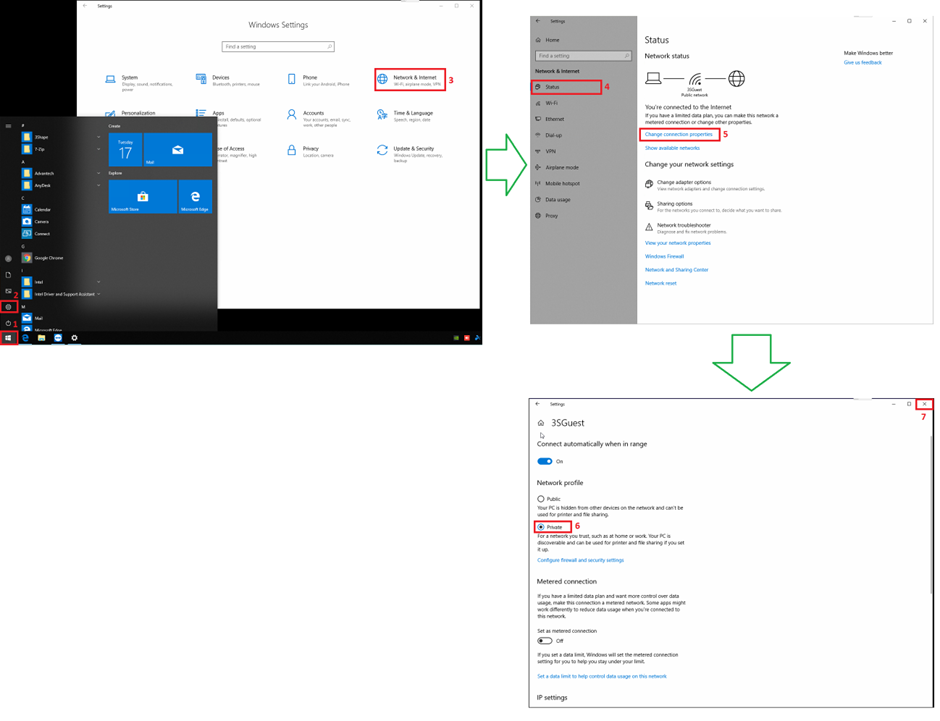
Option 2
Step 1: Open the Start Menu
Step 2: Select Settings
Step 3: Select Network and Internet
Step 4: In the menu on the left select Status and then Change Connection Properties
Step 5: Change from Public to Private and exit the settings. The changes will be applied immediately.
Contact 3Shape Support if you have any further questions.